Hospitality Paperwork Management
Keep Your Hospitality Paperwork Under Control: A Simple Paper and Smartsheet System
Running a hotel, guest house or pub involves plenty of work behind the scenes. Alongside looking after guests, there are fire safety checks to record, maintenance jobs to track, water hygiene logs to complete and contractor certificates to file. Keeping it all organised takes time, especially when you need to find a particular document quickly.
For hospitality businesses across Cumbria, Lancaster and South West Scotland, combining paper folders with a simple digital register, such as Smartsheet, offers a practical way to stay on top of it.
Your team can keep using the forms they know, while you gain an easier way to find records, monitor deadlines and avoid relying on a single paper copy.
Keep What Works
A well-organised paper system still has its place. Staff can pick up a folder, follow an instruction or complete a weekly check without needing to log into anything.
Problems tend to arise when a document is misfiled, a folder disappears or the person who knows where everything is kept moves on. You may be certain that an inspection took place, but finding the certificate to confirm it can be another matter.
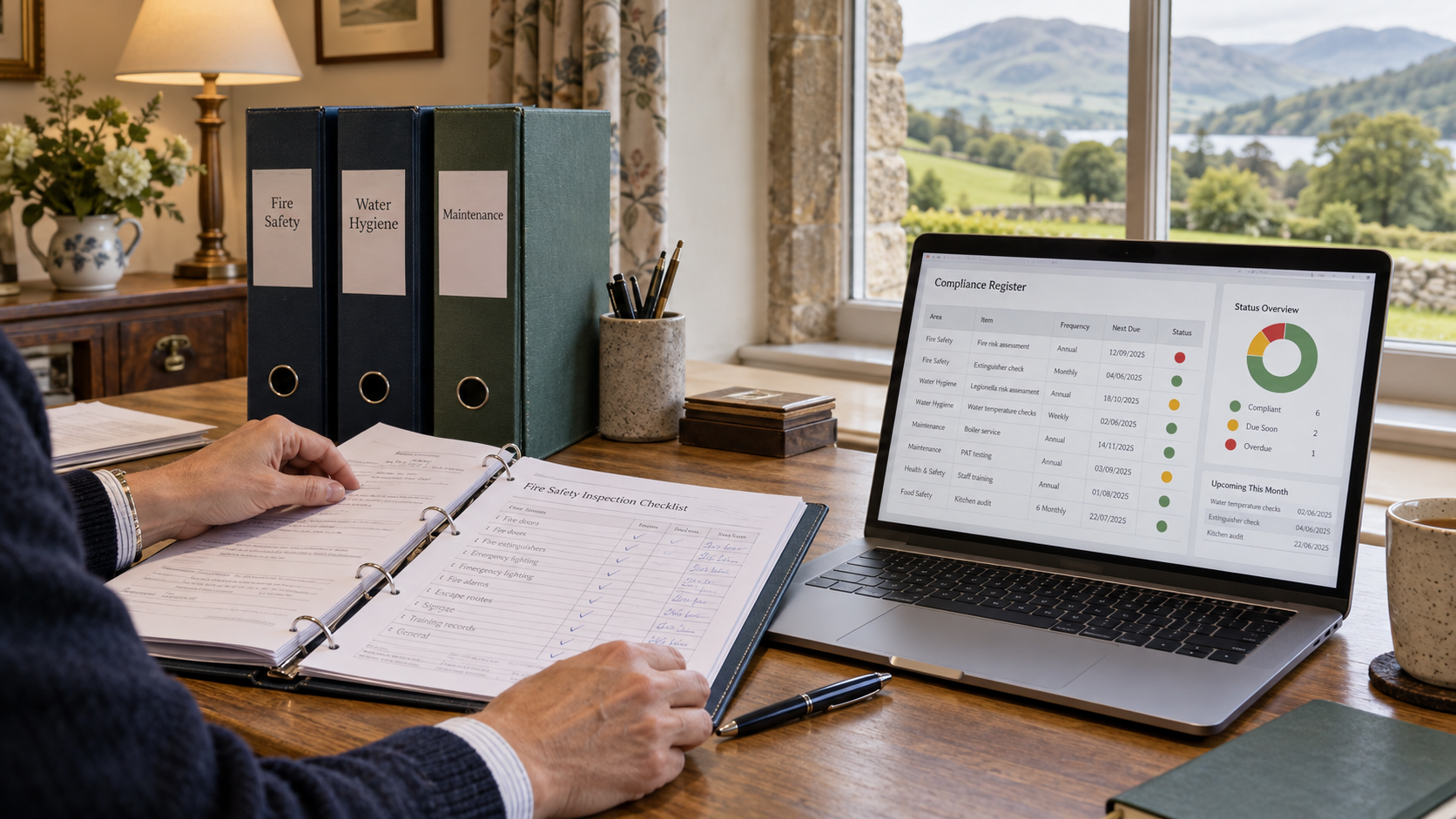
Keeping a digital copy alongside the original gives you another way to find that information. Staff carry on with familiar paperwork, and managers can see what has been completed and what is coming due.
Bring Your Records Together
A digital register can be as straightforward as a single sheet, with tasks grouped under clear headings: fire safety, water hygiene, electrical inspections and routine maintenance.
Each row holds the task, its last completion date, the next due date and the person responsible. Attach a scan or clear photograph of the paperwork to that row, and the record is there when you need it.
After a fire alarm service, for instance, you would file the original certificate in the fire safety folder, attach a digital copy to the relevant task and update its dates. Everything relating to that service is then easy to locate.
You can check when the work was done, find the supporting document and see when it needs doing again—all in one place.
Spot What Needs Attention
Traffic lights make a long list of checks easier to scan. When set up around your schedule, green indicates that a check is within its recorded period, amber warns that the deadline is approaching, and red flags overdue work.
That gives you a useful starting point for planning the week. Instead of opening every folder, you can see which checks need attention first.
The colours are only as reliable as the information entered. A green light shows that the recorded dates are current; it does not, by itself, confirm that the work was carried out properly or that every compliance requirement has been met.
A dashboard can use the same sheet to display upcoming inspections, overdue checks and outstanding tasks by person or department. Staff update the task once, and managers get a clearer picture of progress.
Reduce the Risk of Lost Paperwork
A missing folder is far less disruptive when it does not contain your only copies.
Readable digital records give you a way to recover information if paperwork is misplaced or damaged. They also make handovers easier. A new manager can find the documents they need without having to work out how their predecessor filed everything.
A simple routine helps: upload the completed paperwork, check that every page is clear, then put the original back in the correct folder. Retain any originals that need to be kept.
It is a small habit that can save a great deal of searching later.
Fit the System Around Your Business
Whether you manage a hotel in Carlisle, a Lake District guest house, a Lancaster pub or accommodation in Dumfries and Galloway, record keeping has to fit around a busy working day.
The easier a system is to use, the more likely people are to keep it up to date. Staff should be able to complete a check, file the evidence and update the record without entering the same details in several places.
Used alongside paper folders, a simple Smartsheet register can give everyone a clear point of reference. Staff know where to put completed records, managers know where to look, and deadlines are easier to keep in view.
Start With the Records You Use Most
There is no need to digitise every folder at once. Start with routine fire checks, water hygiene records, contractor certificates and planned maintenance.
Give each task a clear name, attach the latest document and enter the relevant dates. As the process becomes familiar, you can add other records at a pace that suits your business.
For hospitality businesses managing health and safety and building compliance in Cumbria, Lancaster and South West Scotland, this approach offers a manageable starting point. You keep the convenience of paper, gain a central view of your records and reduce the chance of important paperwork being lost when you need it most.
Hospitality Secured
Operations Support | Building Compliance | Food Safety | Health & Safety
Practical support for safer, stronger hospitality.